
01 / THE BIGGER PICTURE
Everything
comes into
focus.
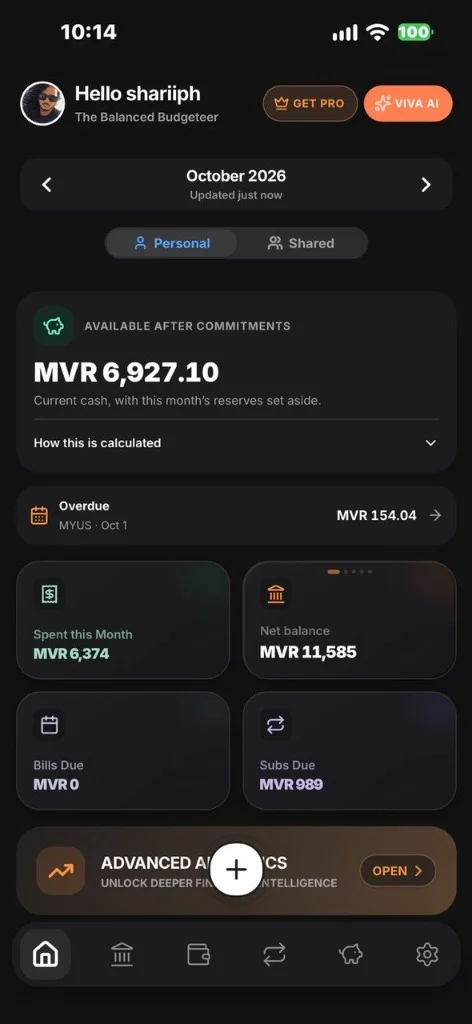
Check balances across your accounts and compare them with your monthly spending.
Total balanceMVR 24,850
Across your accounts · 150+ currencies
Viva Expense Tracker helps you manage money manually on iOS, Android and web. Track spending, bills and savings in one place.
We never request or store your banking credentials or card numbers.
Queue supported changes on your device, then sync to your account when you reconnect.
Secure your finances with device-native Face ID, Touch ID, or PIN passcodes.
Understand account storage, optional AI processing and deletion in our Privacy Policy.
Start with your balances, explore a day’s spending, then check upcoming payments.
Skip to all featuresCheck balances across your accounts and compare them with your monthly spending.
Explore your cashflow calendar. Find the details behind your spending, one day at a time.
Bring bills, subscriptions and recurring loans into one place. Know what’s due before it’s due.
Choose how to enter transactions, organise payments and build your savings.
Log expenses and income, scan receipts with AI, or import a CSV statement. See your spending by category and keep your budgets in view.
Bills, subscriptions and recurring loans, together. See what’s due next and what’s available after your commitments.
Build your Safety Net, save for something special, and track assets and liabilities for a fuller picture of your net worth.
Link with a partner for a shared view of household finances. Each person keeps control of their own records; savings stay personal.
Record supported changes offline and sync when you’re back online. Make Viva yours with light, dark and AMOLED themes.
Tap around. Add a sample expense, pay a bill, or put a little toward your next goal. See how it all connects.
Choose a screen to preview, or try an action below. This sample demo includes Pro access; the free plan has different features and limits. See current plan details in the app.
Interactive preview loads with JavaScript. Read the worked example or get Viva.
Explore six views · Follow a worked example
Explore your Spending DNA, get a monthly report, and ask questions about your spending. Viva AI turns the numbers you enter into a conversation you can understand.
Make sense of your moneyAI availability and usage limits depend on your plan. Review AI-generated results before using them.
Food & groceries is your largest spending category in this sample month, followed by transport.
A category budget could help you keep this spending in view next month.
Viva Expense Tracker is a manual personal finance app for tracking expenses, income, account balances, bills, subscriptions, savings and net worth. It is available on iOS, Android and the web.
Viva Expense Tracker is available on the App Store and Google Play. You can also use Viva Expense Tracker in a web browser.
Viva Expense Tracker supports more than 150 currencies, including Maldivian rufiyaa (MVR), US dollars (USD) and euros (EUR). The website demo uses sample amounts in MVR.
Yes. The interactive website demo lets you explore six screens with sample data, including expenses, bills and savings. No sign-in is required for the demo. It includes Pro access; the free app plan has different features and limits.
Yes. Viva Expense Tracker has a free plan, with Viva Pro available for additional features. Check the app for current plan details, usage limits and store pricing.
Viva Expense Tracker is a manual finance tracker. Add your own accounts and transactions, scan receipts with AI, or import supported CSV statements. Viva Expense Tracker does not require your bank login or full card numbers.
Link a partner to view supported household data, including expenses, income, bills and subscriptions. You can edit only your own records. Safety Net and savings goals remain personal to each user.
Supported changes can be queued offline and synced when you reconnect. You can check the app’s sync status to see whether changes are pending, syncing or synced.
Your account data is protected with database access controls. Optional AI features send the relevant prompts and context to AI providers. Read our Privacy Policy for the full details.
Make room for a calmer relationship with your money.
Prefer a bigger screen? Open Viva on the webFree to get started · Optional Viva Pro subscription
